Translate what SharePoint won’t

Multilingual SharePoint done right.

Fill the gaps native SharePoint leaves behind. Manage every language with confidence, maintain compliance, and give users a seamless multilingual SharePoint experience. Quickly change SharePoint language across your sites, Translate and maintain easily, with less manual work.

See what SharePoint doesn’t translate

Translate your SharePoint, User interface, menu items, site content, documents

Whatever part of SharePoint you are looking to translate, PointFire has a solution for you. You can use the product that suits you or bundle two together.

When native SharePoint multilingual is enough,
and when it isn’t

Most organizations begin with SharePoint’s out-of-the-box multilingual capabilities.
For basic page translation, that may be sufficient.

But native features stop short of delivering a complete multilingual experience.
Key elements remain untranslated, language versions drift out of sync, and IT is left managing updates manually.

PointFire extends SharePoint so multilingual sites work the way users expect — without adding operational overhead for IT.

Komparacija Capabilities
Capability Native SharePoint PointFire
Page translation No Yes
UI localization Partial, manual full, automated
Choice columns & metadata No Yes
Manual sync required Yes No
Language deployment speed Slower Faster
Visibility into gaps No Yes

See full comparative list

SharePoint’s native multilingual features help you get started.
PointFire fills the gaps they leave behind.

What SharePoint doesn’t translate

  • No machine translation of pages
  • No translation or filtering for documents or lists
  • Choice columns are hard-coded in one language
  • UI elements must be localized manually, slowly
  • Language toggle doesn’t fully change UI language
  • Nothing to tell you what needs translating or re-translating

These limitations aren’t obvious at first, until users notice missing or outdated content in their language.

Two solutions, one multilingual strategy

Localize the Interface
PointFire 365

Seamlessly complement SharePoint’s current multilingual features to spare you custom development efforts, including hard coded choice columns and metadata

view product

Machine Translate the content
PointFire Translator

High quality translation for your content, including classic and modern pages as well as documents. Support for over 50 SharePoint languages plus 70 other languages.

view product

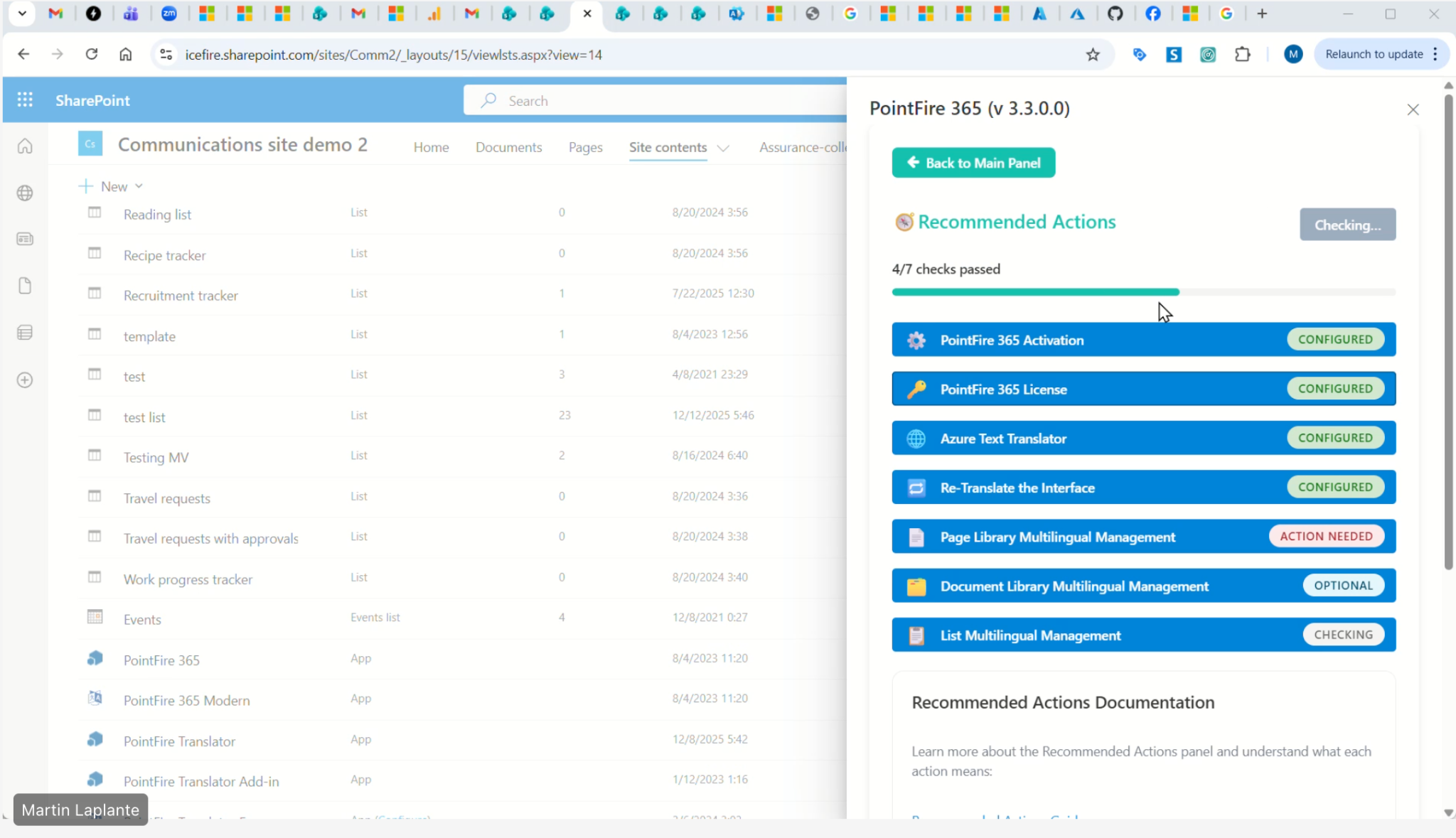
Know what needs attention before users report it

PointFire continuously evaluates your SharePoint environment and surfaces recommended actions in a centralized dashboard.
Get more done with these features that
work across all versions of SharePoint

Isn’t SharePoint already multilingual?
What is the cost of a license?
How long is a license good for?
What is per web front-end licensing?
Are there limits for the number of users we can have?
Can my firm resell your products?
Are there any extra fees?
Can i Process the order by pO?
Is there a free development version?
Do you offer discounts for charities or universities?
STart your free Trial
By clicking “Accept”, you agree to the storing of cookies on your device to enhance site navigation, analyze site usage, and assist in our marketing efforts. View our Privacy Policy for more information.