Introducing PointFire Multilingual Audit: A Free Health Check for Multilingual SharePoint
For years, we've helped organizations build, translate, and manage multilingual SharePoint sites. One thing keeps coming up: many teams don't know where they have gaps in their multilingual content and UI.
In brief
After years of working with hundreds of organizations who need multilingual SharePoint, we are releasing a free tool that audits sites for gaps in the translation of pages, documents, and user interface, with summary scores and prioritized lists of items needing attention, language by language, including compliance issues and hard-to-find errors
Coming soon to Microsoft Marketplace.
For years, we've helped organizations build, translate, and manage multilingual SharePoint sites. One thing keeps coming up: many teams don't know where they have gaps in their multilingual content and UI.
They know they have French, German, or Spanish content. But they often don't know which translations are missing, stale, unpublished, or slow to appear after the source content changes, or whether they comply with language laws.
That realization is what led us to build PointFire Multilingual Audit. And we're making it completely free.
Why we built it
PointFire has always been about making SharePoint work better in multilingual organizations. But we know that not every organization is ready to invest in translation automation or UI localization on day one.
Many organizations start with a manual process and assume it's working well enough. The people maintaining the sites know it's slow, complex, and complaint-driven, but managers often lack the metrics needed to improve it or to demonstrate compliance.
We wanted to give SharePoint administrators, communications teams, compliance officers, and consultants a simple way to answer those questions with real data instead of guesswork.
PointFire Multilingual Audit is a read-only assessment tool that scans your SharePoint environment and produces a scorecard plus a prioritized list of what needs attention first, including quick wins with the most impact. It works inside your Microsoft 365 tenant, nothing leaves your site, and doesn't require any other PointFire software.
Free means free
There is no trial period, no required translation service, and no commitment.
Install it from Microsoft Marketplace, run the audit, and immediately see where your multilingual environment is strong—and where it needs work.
Even (especially) if you've never used a PointFire product before, the audit is valuable on its own.
Who is it for?
If your SharePoint environment supports more than one language, this audit is for you.
It's especially useful for:
- Government organizations that need evidence for official-language reviews.
- Universities and healthcare organizations serving multilingual communities.
- Enterprise communications teams managing content across regions.
- SharePoint administrators responsible for multilingual sites.
- Consultants and system integrators assessing multilingual readiness for clients.
- Organizations expanding internationally and trying to understand the scope of their translation backlog.
Designed with Canadian official-language requirements in mind, it also applies to organizations in Belgium, Wales, Switzerland, the European Union, and anywhere bilingual or multilingual content matters.
Four scores that tell the real story
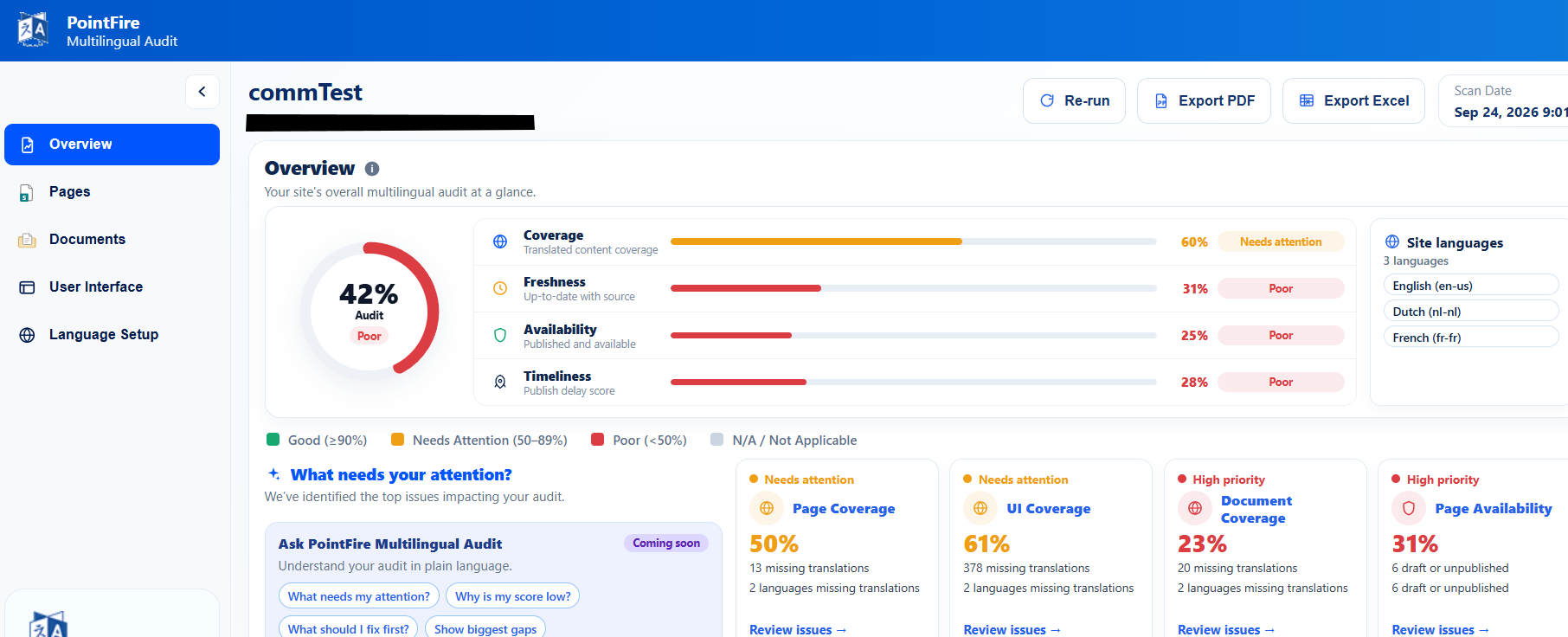
Instead of one opaque number, PointFire Multilingual Audit measures four aspects of multilingual health and lets you drill into the findings behind each score.
Coverage — Are the translations there?
Coverage shows whether pages, documents, and UI elements exist in every required language, then lists exactly what's missing.
Freshness — Are translations keeping up?
Freshness identifies translations that have fallen behind the latest source version.
Availability — Can users actually see the latest translation?
Availability checks whether the latest translations are actually published, approved, and visible to users.
A translated page may exist, but if the latest translated version hasn't been published or approved, users are still seeing an older version—or nothing at all.
The audit looks at the publication history of source and translated content and identifies translations that are not yet available to users.
If you're using SharePoint's native Multilingual Page Publishing feature, this catches the common situation where a translation has been created but nobody has translated, reviewed, or approved the latest draft.
Timeliness — How quickly do translations follow the source?
Equal-quality multilingual communication isn't just about accuracy—it's also about timing.
Timeliness measures how long it takes for translated content to become available after the original is published.
Rather than using an average, the audit uses the median publication delay and concentrates on the most recent items, making the score resistant to a few unusually slow translations.
The result is a score that recognizes organizations that consistently publish translations quickly while highlighting translation bottlenecks.
It audits much more than pages
A multilingual SharePoint environment includes far more than page content.
PointFire Multilingual Audit also evaluates:
Each category contributes to a broader multilingual score while also producing a detailed list of findings you can act on.
Designed for compliance—but useful for everyone
One of the goals behind the audit was to help organizations answer questions that auditors and executives ask:
- Are both official languages receiving the same information?
- Are translations published at the same time?
- Do we have measurable evidence of multilingual coverage?
- Can we track improvement over time?
The audit is guided by Canadian government regulations around language toggles, metadata, simultaneity, and equal quality of multilingual communications, but those principles translate remarkably well to any multilingual organization.
Whether your motivation is legislation, accessibility, internal policy, or simply providing employees with an equal experience in every language, the audit gives you objective measurements instead of assumptions.
That trust matters. If users suspect the version in their language is incomplete, outdated, or different from the original, they will stop using SharePoint in their language and switch back to the source language instead. And SharePoint has no direct way to measure that.
A score is only useful if it tells you what to fix
This is the part I'm most excited about. Every score is backed by a list of findings.
Instead of just seeing “Freshness: 64”
You'll also see:
- Benefits page — French translation outdated.
- Employee handbook — German translation missing.
- Policy update — French translation exists but is awaiting publication.
It gives you the published date or the item and its translation, not just the last modified date, because that's how it measures how long users have been without a translation. It detects if the actual language of a page or document is not what it claims to be. It checks what language the users are seeing.
The overview page gives content owners and SharePoint administrators a prioritized work list: what needs attention first, and the quick wins that will have the most impact.
It works with SharePoint alone...
PointFire Multilingual Audit is intentionally useful even if SharePoint is your only multilingual tool.
It complements SharePoint's built-in multilingual features by providing visibility that SharePoint doesn't currently provide across pages, documents, UI elements, metadata, publication status, translation timing, and even which language users actually choose to use.
If you're using native SharePoint multilingual pages, the audit helps you understand how well that feature is actually working across your sites.
...and it's even better with PointFire
Of course, we'd be lying if we said we weren't hoping this tool introduces more organizations to the rest of the PointFire family.
Once you've identified missing translations, outdated content, unpublished language versions, or untranslated UI elements, it's natural to ask how to fix those issues more efficiently.
That's exactly where PointFire 365 and PointFire Translator come in: translating SharePoint pages, documents, metadata, and UI elements, automating re-translations when source content changes, and making multilingual SharePoint much easier to manage.
But the audit comes first.
Measure your multilingual environment, understand the gaps, and decide what improvements matter most for your organization.
Coming soon to Microsoft Marketplace
PointFire Multilingual Audit will soon be available for free on Microsoft Marketplace.
I'm looking forward to seeing organizations use it as a multilingual health check for their SharePoint environment—whether they're just getting started with multilingual content or managing hundreds of sites and hundreds of thousands of pages across dozens of languages.
Sometimes the hardest part of improving a multilingual site is simply knowing where to begin. My hope is that PointFire Multilingual Audit makes that first step easier.
Make multilingual SharePoint easier.
Try PointFire in your own SharePoint environment and see how it works for your team.