How to Build a Business Case for Multilingual SharePoint
You know your SharePoint multilingual content needs work. The challenge is showing what it will take to close the gap.
In brief
Your multilingual SharePoint sites need work. Missing or outdated translations, user interface elements not translated, metadata in the wrong language. Writing a business case to convince your boss to fix it starts with a comprehensive audit.
You know your SharePoint multilingual content needs work. The challenge is showing what it will take to close the gap.
It is easy to say that translations are incomplete, outdated, or difficult to manage. It is more persuasive to show management exactly how much content is affected, where the gaps are, and how much it would cost to fix them.
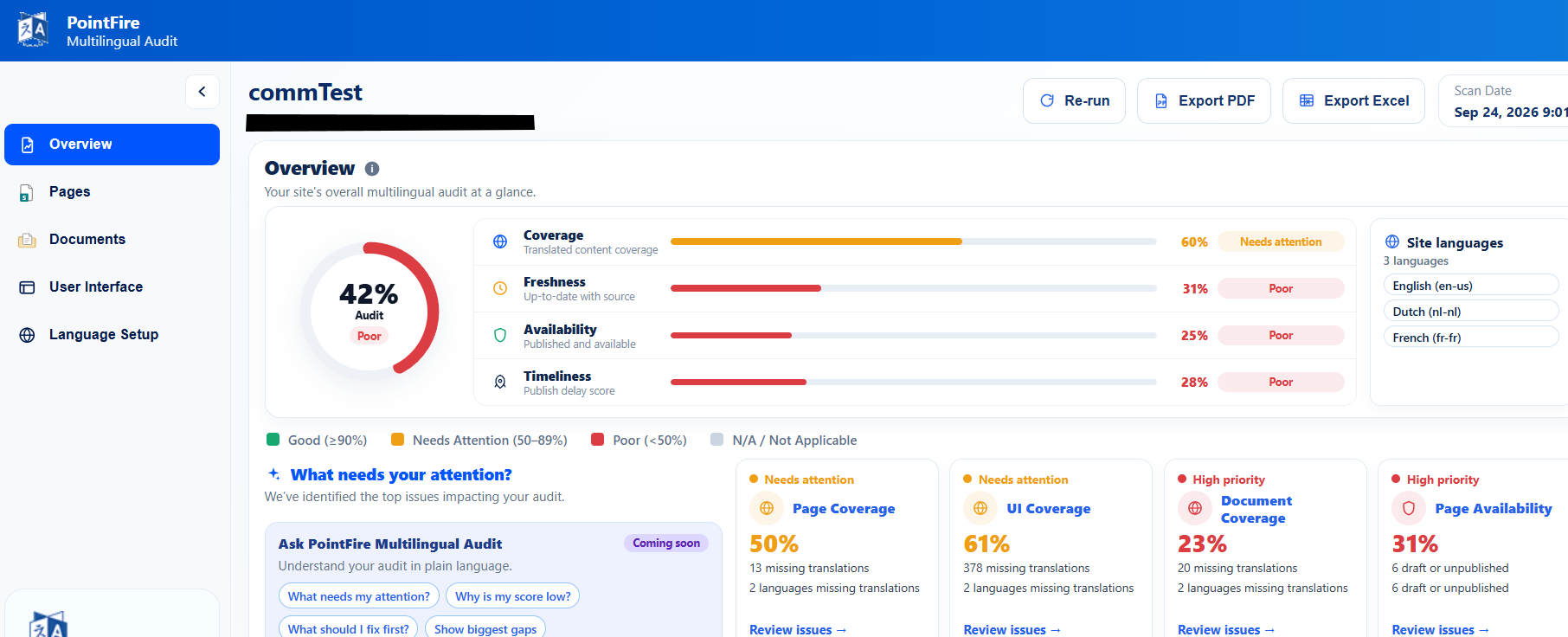
That is where PointFire Multilingual Audit can help. The free audit gives you an objective picture of your multilingual SharePoint environment and the evidence you need to estimate the work required to improve it.
Start with the audit
A good business case starts with your current situation.
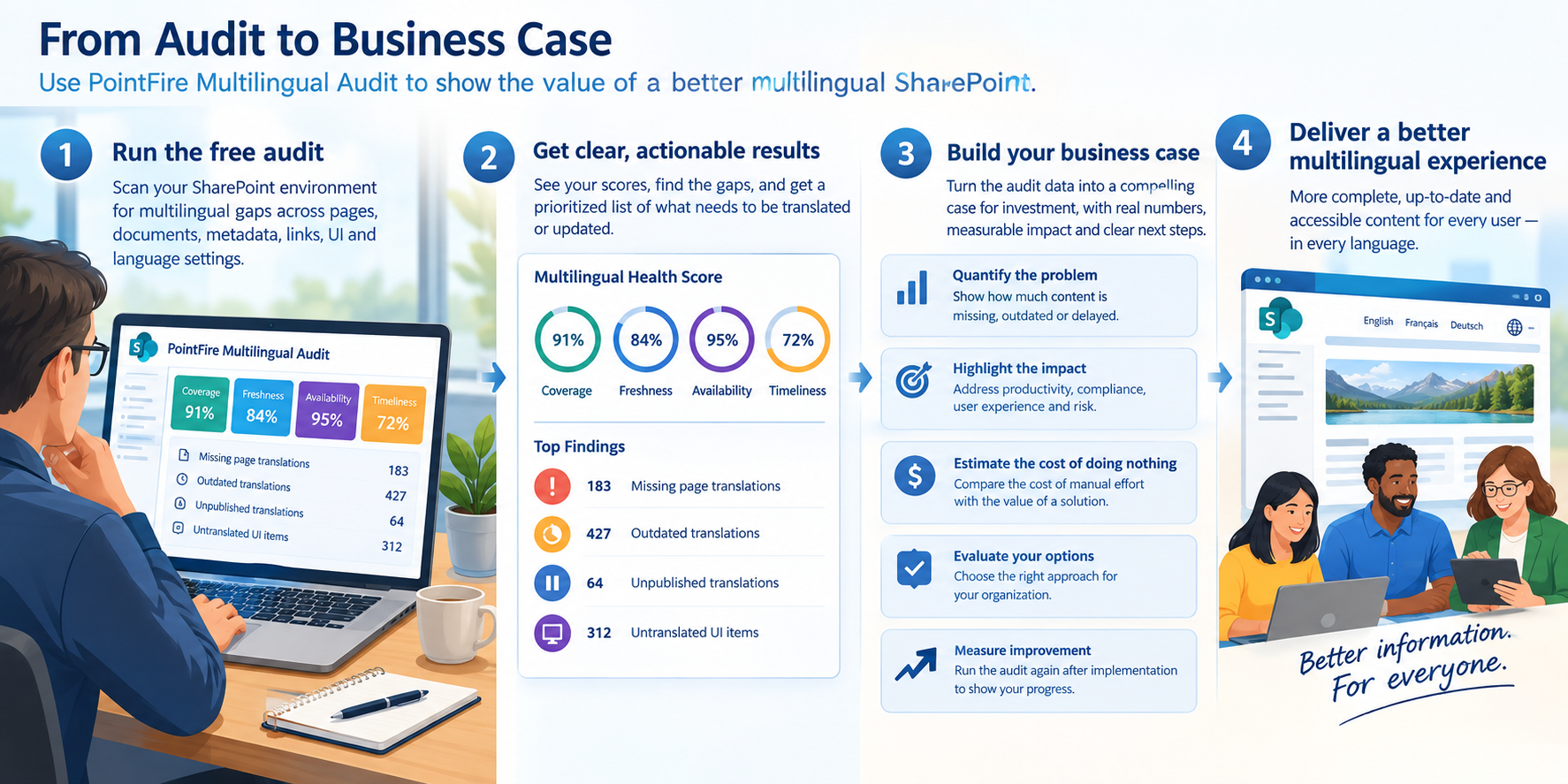
Run PointFire Multilingual Audit against representative SharePoint sites and establish a baseline. You can show:
- How many pages require translation
- How many documents are missing translations
- How many existing translations are outdated
- How many translations have not been published
- How long translations take to become available
- What are the gaps in the translation of the UI
- Which sites or departments have the largest gaps
- How many people are currently using it in their own language
Now the discussion is based on facts, not feelings, personal experiences, or vague user complaints.
Quantify the translation backlog
One of the simplest business-case questions is:
"How much content are we talking about?"
The audit identifies content that is missing a required translation and calculates Coverage.
For example, you might discover:
92% page coverage
1,840 pages should have a French version
147 French translations are missing
That turns "we have some translation gaps" into an estimate of the level of effort required, or a proposal for new technology or new processes.
Show that existing translations are becoming outdated
Translation isn't a one-time project. A page translated today may be changed tomorrow.
The audit's Freshness measure identifies translations that have fallen behind their source content. It tells you how many items have been updated after they were translated.
This can be particularly persuasive because it demonstrates the need for new processes, not simply an initial translation backlog.
Identify translations that aren't actually available
A translation can be created but remain in draft, awaiting review or approval.
PointFire Multilingual Audit measures Availability by comparing the publication status and dates of source and translated content.
This can reveal situations where the native page translation process was started but never completed.
Measure how long translation actually takes
Another useful business-case question is:
"How quickly do our users get the information in their language?"
The audit measures Timeliness by comparing publication times for source and translated content. You should establish an SLA for how long translation takes, and this metric gives you a way to measure it.
After improving your translation process, you can run the audit again and determine whether that number has improved.
Don't overlook the multilingual user interface
A business case based only on translated pages and documents underestimates the problem.
Users interact with SharePoint through navigation, metadata, headers, view names, choice columns, and other interface elements. The audit measures those items too.
This is different from missing pages: users notice untranslated navigation, metadata, and interface labels immediately, and those items can take more time to fix than they appear to require.
Turn the audit into a management scorecard
A useful business case doesn't need to present management with hundreds of individual findings. Start with a small set of KPIs.
For example:
Then provide the detailed audit as supporting evidence.
This gives executives a simple picture while allowing the project team to drill down into individual issues.
Estimate the cost of closing the gap
The audit shows what has already been translated using current processes and what remains to be done. You may consider different options: continuing manually, different apps or automation options, etc. It can even propose PointFire Translator Express and/or PointFire 365 😉
Use those counts to estimate the cost of closing the gap under different approaches.
Consider:
Cost to close gap = items requiring attention × translation cost per item × effort multiplier
The effort multiplier expresses how much additional work is required beyond the base translation cost. It accounts for review, formatting, publishing, testing, coordination, and verification. A simple translation may use 1.0; a partial update may use less than 1.0; work that requires extra verification may use more than 1.0; outdated translation = 0.4–0.7; unpublished translation = 0.1–0.2; metadata, navigation, and UI issues = based on testing and rollout effort.
The free audit has already reduced the cost of finding what needs attention to zero; what remains is the cost of translating, reviewing, publishing, and verifying those elements. Treat the counts as a snapshot. Estimate new annual issues from the rate of source-content change and the number of languages affected.
Apply the same formula to each option, changing the multipliers and adding any technology, translation, service, or internal effort costs. The result is not a claim of savings; it is a comparison of the cost to close the same gap in different ways.
Run the audit again after implementation
A particularly powerful part of the business case is that the same measurements can be used after the project. You should see all the KPIs go up. It will also provide a better estimate for ongoing costs.
Usage by language is also a success measure, and one that the audit measures. If users trust that content in their language is complete and up to date, they are more likely to use that version of the site.
PointFire Multilingual Audit is free and can be used with SharePoint whether or not you use other PointFire products.
Make multilingual SharePoint easier.
Try PointFire in your own SharePoint environment and see how it works for your team.