SharePoint Native vs. PointFire: Why the Multilingual Columns Are Different
If you've ever looked at the hidden columns in the Site Pages library after enabling multilingual publishing, you may have noticed that SharePoint and PointFire's multi-page model use different columns to manage language versions.
In brief
SharePoint's native page model stores different metadata for source pages and translations, tying originals to the site's base language. PointFire's multi-page model uses an item language and source lookup for every page, allowing originals in different languages and deriving translation relationships dynamically; existing content and third-party app compatibility can still favor the native model.
One of the decisions that you have to make when you configure PointFire 365 is choosing between different multilingual page models. There are two principal models: SharePoint native multilingual page publishing (MLP) and PointFire multi-page. There is also a third one: single-page, which lets you show different language-specific webparts in different languages, but we will leave that aside for now. Native MLP and multi-page are similar, in that they both redirect users to the page in their language if it exists, but multi-page has more functionality even though it is simpler.
If you've ever looked at the hidden columns in the Site Pages library after enabling multilingual publishing, you may have noticed that SharePoint and PointFire's multi-page model use different columns to manage language versions.
At first, this can seem surprising. After all, both solutions support multilingual pages. Why don't they store the same information? The answer lies in the very different design philosophies behind the two approaches.
SharePoint's Approach
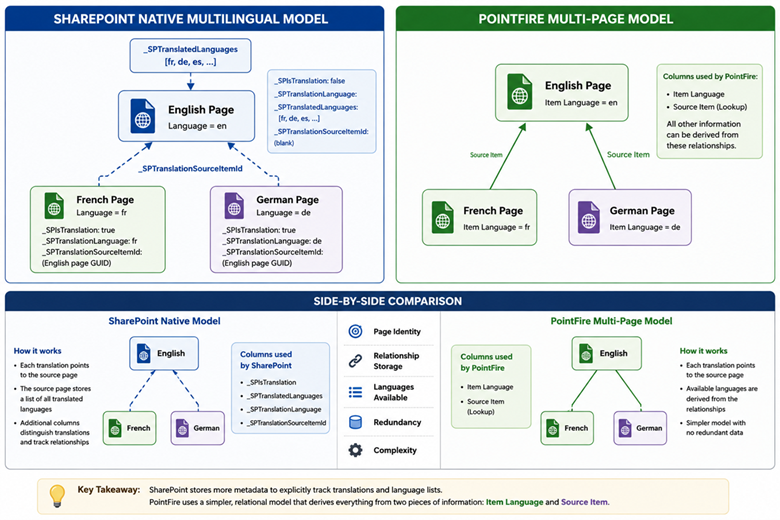
SharePoint's native multilingual publishing is asymmetric multilingualism: the source page must be in the immutable base language of the site. Translated pages and source pages record different information and behave differently.
To support this model, SharePoint adds four multilingual-specific columns:
|
Column |
Purpose |
|
_SPIsTranslation |
Indicates whether this page is a translation. |
|
_SPTranslatedLanguages |
Lists the language codes for all translations associated with this source page. |
|
_SPTranslationLanguage |
Stores the language of the current page if it is a translation |
|
_SPTranslationSourceItemId |
Stores the GUID of the source page from which this translation was created. |
For translations, _SPTranslatedLanguages is blank. For source items, _SPTranslationLanguage and _SPTranslationSourceItemId are both blank. The source item’s language is necessarily the same as the base language of the site.
This is a de-normalized data structure, in that it has duplicate information that has to be kept synchronized. For example, if you delete a translation, something has to go back and change the value of _SPTranslatedLanguages of the source page.
Each translated page is otherwise a completely separate SharePoint page with its own:
- version history
- publishing status
- page content
- metadata
- permissions (if customized)
Microsoft intentionally allows each translation to evolve independently after it has been created.
We call this model asymmetric because the fact that you cannot translate from any language other than the base language of the site is baked in. This also affects redirection in that it can redirect from the base language to other languages, but other redirection directions do not necessarily work. It's also asymmetric because one language gets exclusive use of the root of the library, while others are relegated to language-specific folders, and the file names are in the root language.
As a de-normalized data structure, it requires more maintenance to be kept in sync when there are changes. As a server-side feature, this is easier to do than if it was a client-side app.
PointFire's Approach
PointFire follows a much simpler model, which ironically gives it flexibility for its additional capabilities.
Every page has two multilingual-related columns:
|
Column |
Purpose |
|
Item Language |
The language of this page. |
|
Source Item |
A lookup to the page that is the source page if it is a translation, and to itself otherwise. |
That's it. There is no need to record whether a page is a translation or maintain a list of every translated language. Those relationships can be inferred directly from the pages themselves. Every translated page simply points back to its source page.

This is a symmetric model because the source item can be in any language. There are no de-normalized columns that have to be kept in sync. If you delete a translated page, there is no need to update the source page.
The fact that it is a lookup column gives it some superpowers. For example, you can turn on the cascading delete, which means that if you delete the source page, all of the translations will be deleted at the same time.
Having the Item Language work the same way for the source and the translations, this makes language-specific search much, much simpler.
Also, since there is no dependency on the base language of the site for redirection or anything else, PointFire can use the same mechanism for documents and for list items as it does for pages, which means that language-specific search works the same way, with a single crawled or managed property, for pages, documents, or list items.
Why Doesn't PointFire Need a "Translated Languages" Column?
Suppose an English page has French and German translations. Whenever PointFire needs to know which language translations exist, it simply finds all pages whose Source Item points to the current source page.
This has several advantages:
- No duplicate information to maintain
- No risk of the language list becoming inconsistent
- Fewer columns to manage
The available languages are determined dynamically rather than being stored explicitly.
Why Doesn't PointFire Need an "Is Translation" Flag?
In SharePoint, a page may be either:
- an original page
- a translated page
The _SPIsTranslation column distinguishes between the two.
PointFire doesn't need this flag because the relationship is already defined by Source Item.
If a page has no source item or a lookup to itself, it is the source page. If it references another page, it is a translation. The lookup relationship contains all the information required.
Different Models for Different Goals
Neither approach is inherently better—they're simply optimized for different architectures. SharePoint's native de-normalized schema might be more efficient in some cases, but PointFire makes up for that by caching the translations relationships so it can redirect faster, from the client side not the server side.
You might prefer SharePoint's native model if you already have a lot of pages that use it or if your staff is already familiar with it. Some third-party apps are programmed to not turn on their multilingual features unless the native MLP feature is turned on, which is unfortunate, so if you use those apps, you may need to use the native feature.
If you need a symmetric multilingual solution, for example if you created a lot of German pages on a site whose base language is English, or if you migrated a lot of pages from another site or from on premise, which changes the page GUID and breaks the translation relationships, then only the PointFire multi-page model can save you.
Make multilingual SharePoint easier.
Try PointFire in your own SharePoint environment and see how it works for your team.